

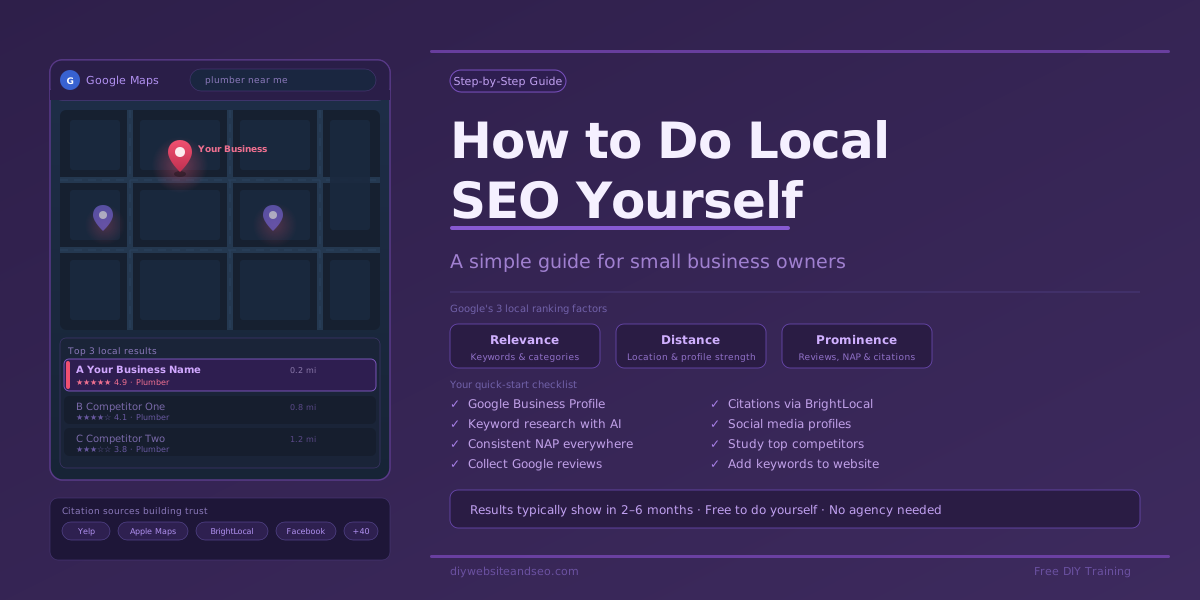
You can absolutely do SEO yourself with a little patience
How to Do Local SEO Yourself? Imagine someone in your town just typed plumber near me into Google. Will your business show up? If you are not sure, or want to pull up better, this guide is for you. Local SEO sounds like a big, scary phrase. But it just means helping Google find and trust your business so the algorithms will rank you higher and more people in your area can find you. It’s simple, SEO is about where, what and how to place information. Once you know its easy.
The best part? You can do most of this yourself — for free. No fancy degree. No big budget. Just a little time and the right steps.
This guide walks you through exactly what Local SEO Experts do for their paying clients. Follow these steps and you will start showing up higher on Google Maps and in local search results — usually within two to six months or less.
What Is Local SEO and Why Does It Matter?
Local SEO strategy is the practice of helping your business show up in the top 3 positions when people nearby search for what you offer. When someone searches pizza near me or electrician in Dallas, Google picks the businesses it trusts most and shows them at the top, especially on Google Maps. The overall goal is for your business to pull up higher while farther away.
Think of Google like a giant filing cabinet. Every business has its own folder. Google fills that folder with everything it can find about your business online – your website, reviews, social media pages, directory listings, and more. Then it compares your folder to your competitors and decides who to show first.
Local SEO is simply the act of making your folder as full, clear, and trustworthy as possible. The good news is that most small business owners never do this, which means doing it gives you a real edge.
Step 1: Find the Right Keywords With AI
Before you write a single word about your business online, you need to know what words your customers are actually typing into Google. These are called keywords.
The easiest way to find them is to ask an AI tool like ChatGPT, Grok, Gemini, or Claude. Just type something like this:
“Please list the top 10 keywords people search on Google to find a plumber in Phoenix, Arizona. Also list common words used in the plumbing industry.”
You will get a list of real search terms people use. Save them, you will use them in your Google Business Profile, on your website, and everywhere else you describe your business online.
Want to go deeper? Try free tools like Google Trends or Google Ads Keyword Planner. Paid platforms like MOZ, Seobility, SEMRush or Ahrefs go even further, but AI is a great starting point and gets you most of the way there.
Step 2: Set Up and Fully Fill Out Your Google Business Profile
Your Google Business Profile (also called a Google Maps listing) is the single most important tool for a local SEO strategy. It is completely free. If you have not set one up yet, go to google.com/business and do it today.
Most businesses set up a profile and stop there. That is a big mistake. You want to fill out every single section. Here are the most important ones:
– Business Description
You get 750 characters. Use them all as close as possible. Ask AI to write a friendly, keyword-rich description for you. Here is an example prompt:
“Write a Google Business Profile description, close to 750 characters, using these keywords: plumber Phoenix AZ, emergency plumber, 24/7 plumber, water heater, drain cleaning. Make it friendly, unique, and SEO-optimized”.
Then add your own personal touch to make it sound like you. This is a must?
– Categories
Pick the most accurate primary category for your business. Only add a second category if it truly fits — like an auto shop that also sells parts. Do not stuff this area with extra categories just to rank for more terms. Google rewards accuracy and penalizes shady practices aka black hat SEO.
– Services and Products
List every service you offer in detail. Instead of just writing Plumbing, break it down into Drain Cleaning, Water Heater Repair, Pipe Services, and so on. The more specific you are, the better Google understands what you do and when to show you.
– Photos
Upload as many photos as you can — inside your shop, outside, your team at work, finished projects. Tip 1: rename your photo files with keywords and or industry words before you upload them. Instead of IMG_4521.jpg, rename it drain-cleaning-phoenix-az.jpg. This small step helps Google understand what the photo shows. Tip 2: Before uploading to Google Maps upload your images that others online may use to Unsplash or Pexels, then in the attributions/credit area place a link to your website. Wait a few months then search your image in google to see if anyone used. Then email to ask for a source link from their website.
– Google Posts
Think of Google Posts like mini social media posts that show up right on your Google Maps listing. Try to post at least once a month or more. You can ask AI to generate post ideas for your industry — a flower shop could post about different flower types, bouquet styles, or seasonal arrangements.
– Reviews
Reviews are a factor Google uses to rank local businesses. The more genuine experience good reviews you have, the more Google trusts you. Go to your Google Business Profile, click Reviews, and then click Get more reviews. Share that link with happy customers by text, email, or a QR code on a receipt or business card.
Step 3: Understand the 3 Things Google Uses to Rank Local Businesses
Google uses three main factors to decide which local businesses to show, and where. Knowing these helps you focus on what matters most.
Step 4: Make Sure Your Name, Address, and Phone Number Match Everywhere
Your business name, address, and phone number — called NAP — must be exactly the same on every website across the internet or on most.
If your Google listing says Main St. but Yelp says Main Street, Google sees a mismatch. Accuracy is key, too many mismatches hurt your trust score. Pick the exact format you want and stick to it everywhere.
Step 5: Get Your Business Listed in Online Directories (Citations)
Every time your business information appears on another website — Yelp, Apple Maps, Facebook, a local chamber of commerce, that is called a citation. Citations are like little votes of trust for your business. The more quality citations you have, the more Google trusts you.
One of the easiest ways to build citations fast is through a service called Bright Local (brightlocal.com). It is free to join, and you can pay just for the submissions you need. Once you enter your business information, Bright Local pushes it to dozens of directories and data aggregators all at once, including Apple Maps, Yelp, GPS networks, and more. For ultimate savings you can do it yourself individually.
A data aggregator is a company that collects and shares your business information with hundreds of other platforms. Getting listed in the main aggregators is like planting seeds — your information spreads far and wide across the internet.
Important: Finalize your business name, address, phone number, and description before you submit anything. Once those submissions go out, you need to resubmit.
Step 6: Create Social Media Profiles for Your Business
You do not need to post on social media every single day to benefit from it. Simply creating business profiles on Facebook, X, Instagram, LinkedIn, and other major platforms adds more citations to your Google file and makes your business look more legitimate, however make sure to add your NAP.
Once you create them, add the links to your Google Business Profile and to your Bright Local account so they get shared in your citation submissions. These social pages also show up in Google search results when people look for your business name — which is free real estate worth having.
Step 7: Study Your Competitors
One of the smartest moves in local SEO is studying the businesses already ranking at the top. Search for your own business the same way a customer would. Look at the top three results on Google Maps. Ask yourself:
Whatever your top competitors are doing well, try to match it, and then do a little more. In many smaller towns or less competitive industries, just following all the steps in this guide will put you ahead of most of the competition.
Key things to remember when searching: Google is basing your search off your current location, so try different keywords and versions. Also clear your browser cookies/cache every time. You could also use SEO softwares like MOZ for deeper research.
Step 8: Use Your Keywords on Your Website Too
Your website and Google Business Profile work together. The keywords you found in Step 1 should also appear on your website pages – in the text, the page titles, and the metadata (the behind-the-scenes description of each page).
For example, if your main keyword is Plumber Phoenix AZ, that phrase should appear naturally on your home page. If you want to rank for a second term like
Emergency Plumber, create a separate page on your website focused on that topic. This fits into an organic SEO strategy and combined with local SEO gives you the strongest possible online presence.
How Long Does Local SEO Take to Work?
Most all people who follow these steps see real results in two to six months or less. The speed depends on your pace and how competitive your market is. A plumber in a big city will take longer to climb in search than a florist in a small town. Also, a more competitive market requires more to maintain rankings.
Here is the great thing about local SEO: once it works, it keeps working, you may need to maintain but you don’t have to keep paying for ads every month. Your effort builds on itself over time, the more you put in now, the more customers you attract for years to come. Every effort helps your overall presence. If you have overlooked local SEO and are utilizing Pay Per Click ads it is wise to continue both until you can start easing off on ads. You likely will once you see the power of local SEO.
Watch the Free DIY Local SEO Training Video
Want to see every step in action? There is a free video training guide that walks you through the entire process — from keyword research and Google Business Profile setup to Bright Local citations and beyond.
Watch the free step-by-step Local SEO Training video. It is the same process used for paying SEO clients, taught step by step so any business owner can do it themselves. Combine it with a Website SEO Training video and your set, you simply need to do the work and be patient. The results will likely surprise you.
Your Local SEO Quick-Start Checklist
Use this as your action list. Check each one off as you go:
□ Use AI and tools to find your top local keywords
□ Set up and fully complete your Google Business Profile
□ Make your NAP (name, address, phone) consistent everywhere
□ Upload keyword-labeled photos to your profile
□ Start collecting Google reviews from happy customers
□ Create business profiles on major social media platforms
□ Submit to aggregators and citations through Bright Local
□ Study your top local competitors
□ Add keywords to your website pages and metadata
□ Watch the free video training for the full walkthrough
You Can Do This
Local SEO is not magic. It is not reserved for big companies with big budgets. It is just a set of clear, learnable steps that most small business owners simply have never been shown or don’t have the time for.
Now you know the steps. Start with your Google Business Profile today. Every step you take puts you ahead of a competitor who never bothered or won’t see you coming. In a few months, you will start seeing new calls, new leads, and new customers – all from people in your area who found you on Google.
And if you ever want to watch every step in a real training video, head over to diywebsiteandseo.com. You have got this.
If your newer or haven’t tried MOZ SEO software yet, it’s entirely beginner friendly and even has a helpful chrome extension. You passed the link earlier.